YouTube Shorts can be up to three minutes long. Square or vertical videos uploaded on or after October 15, 2024, are categorized as Shorts when they are no longer than three minutes.
There is no published minimum, so the best length depends on the idea: use the shortest duration that explains or completes the video properly.
Here are the rules at a glance:
The rest of this guide covers how three-minute Shorts actually work, what length performs best, the music and copyright rules to watch for, whether length affects monetization, and why a video sometimes fails to appear as a Short at all.
Let’s dive into finding that balance and discovering the perfect YouTube Shorts length to build a larger and more loyal audience in less time.
H2: How long can a YouTube Short be in 2026?
The current maximum is three minutes. This applies to videos uploaded on or after October 15, 2024, from that date, any new vertical or square video up to three minutes long is automatically treated as a Short and pushed into the Shorts feed.
The three-minute ceiling replaced the original 60-second limit and gives creators more room for tutorials, storytelling, commentary, and explainers without switching to long-form. It does not change the core experience: Shorts are still vertical, full-screen, and built for swiping.
A couple of details matter here. The limit is a ceiling, not a target, a Short can be any length up to three minutes. And eligibility is tied to the upload date, so videos published before October 15, 2024 keep their original classification even if they are short and vertical.
How Long Can YouTube Shorts Be in 2026?
YouTube Shorts now support videos that are up to 3 minutes long, which is a significant change from the original 60-second limit the platform launched with.
This shift is especially useful for creators working in education, storytelling, commentary, or anything that benefits from more time without needing a full-length video.
That said, just because Shorts can be three minutes doesn’t mean that’s always the right choice. On a platform built around fast scrolling and short attention spans, a tighter, more focused video still tends to perform better (especially when your goal is watch time, completion rate, or replays.)
How do three-minute YouTube Shorts work?
A video qualifies as a Short when it is vertical or square, three minutes or shorter, and uploaded on or after October 15, 2024. You do not toggle a setting; YouTube categorizes it automatically based on format and length.
You can upload a three-minute Short either way:
- From mobile: record or select footage in the YouTube app, trim it to three minutes or less, and publish. The app’s Shorts camera and editor handle vertical footage natively.
- From desktop: upload a vertical or square file through YouTube Studio. As long as it meets the format and length rules, it is published as a Short.
Videos uploaded before October 15, 2024 are unaffected. A vertical clip from early 2024 stays a regular long-form video on the Watch page and keeps long-form monetization, it does not retroactively become a Short.
There is one exception on timing. For Official Artist Channels and channels linked to a music Content Owner, the cutoff to start treating qualifying uploads as three-minute Shorts is December 8, 2025, later than the standard-channel date.
Finally, keep the difference between the maximum and the ideal in mind. Three minutes is the most a Short can run, not the length that works best. Most Shorts should be far shorter than the ceiling.
What is the best YouTube Shorts length?
There is no single perfect length. The right duration is whatever completes the idea without padding. Different formats naturally sit in different ranges:
- Under 15 seconds: loops, quick reveals, one-line jokes, satisfying moments people rewatch.
- 15–30 seconds: one tip, one answer, one before-and-after transformation.
- 30–60 seconds: product demos, commentary, short how-tos, reactions with a little context.
- 60–180 seconds: stories, side-by-side comparisons, and deeper explainers that genuinely need the time.
The rule that holds across all of them: use the shortest length that lets the idea land without rushing it. A tight 20-second Short usually beats a padded 90-second one. Let the content set the length rather than stretching to fill the ceiling. If your goal is reach, pairing the right length with solid video editing and more views on YouTube tactics matters more than the raw duration.
Is there a minimum length for YouTube Shorts?
YouTube does not publish a formal minimum duration. Very short clips, a few seconds, can still qualify and appear in the feed. The practical limit is attention, not policy: a clip needs enough substance to give viewers a reason to stop scrolling, react, or replay. If a video is so short that it reads as an accident or a fragment, it will not hold anyone. So while there is no floor to clear, aim for a clip that feels complete rather than merely brief.
Can you use music in a three-minute YouTube Short?
You can, but the rules tighten as Shorts get longer, so it is worth knowing them before you build a three-minute video around a track.
- Most tracks in the Shorts Audio Library can be used for up to 90 seconds in a Short.
- Some tracks are limited to 30 or 60 seconds, depending on the licensing.
- A Short longer than one minute that carries an active Content ID claim is blocked globally — regardless of the specific policy on that claim.
- For longer Shorts, original audio or royalty-free music is the safer choice, since it avoids Content ID claims entirely. Our guide to adding music to YouTube Shorts walks through the options in detail.
If your idea needs the full three minutes and a soundtrack throughout, do not rely on a clip from the Audio Library that only clears 60 or 90 seconds. Either keep the licensed music within its allowed window or use audio you own.
Does Shorts length affect monetization?
Length alone does not decide whether a Short earns money. What matters is eligibility and rights:
- Your channel must be accepted into the YouTube Partner Program before any Short can be monetized.
- A Short with an unresolved Content ID claim cannot be monetized — the revenue routes to the rights holder instead.
- Engaged views still matter. On March 31, 2025, YouTube changed how raw views are counted (more on that below), but Partner Program eligibility and Shorts ad-revenue sharing are based on engaged views, not the inflated raw view count.
So a three-minute Short is neither better nor worse for monetization than a 20-second one purely on length. Clear the Partner Program bar, keep your audio clean of claims, and earn real engaged views.
Why is my video not showing as a YouTube Short?
If a video you expected to appear in the Shorts feed is showing up as regular content, or not at all, one of these is usually the cause:
- It is longer than three minutes, so it does not qualify as a Short.
- It is in landscape format rather than vertical or square.
- It was uploaded before October 15, 2024, so it keeps its original long-form classification.
- Processing is not finished yet — give it time to complete before troubleshooting.
- It runs longer than one minute and has an active Content ID claim, which blocks it.
- The format or aspect ratio is off — an unusual ratio can keep it out of the Shorts experience.
Work through that list top to bottom, and you will almost always find the reason.
How to tell whether your Shorts length is working
Skip vague claims about what “the algorithm loves” and watch the signals you can actually measure:
- Viewed vs. swiped away — how many people stayed instead of scrolling past.
- Engaged views — the metric tied to monetization and real interest.
- Audience retention — where viewers drop off inside the video.
- Average percentage viewed — how far through people get on average.
- Replays — a strong sign for short, loopable clips.
- Shares — the clearest signal that a Short resonated.
- Subscribers gained — whether the Short converted viewers into followers, often helped by the best hashtags for YouTube Shorts.
Read these against length. If retention collapses halfway through your 90-second Shorts, they are probably too long for the idea. If your best-performing clips are consistently under 20 seconds, that is your signal to keep future videos tighter.
How to make a YouTube Short with Async
The Async video editor turns raw footage into a clean, properly sized Short without manual editing busywork. If you are new to the format, start with our walkthrough on how to make a YouTube Short. The steps below cover the essentials:
- Upload footage or start from a prompt.
- Ask Async to find the strongest moments in your clip.
- Remove dead space and filler automatically.
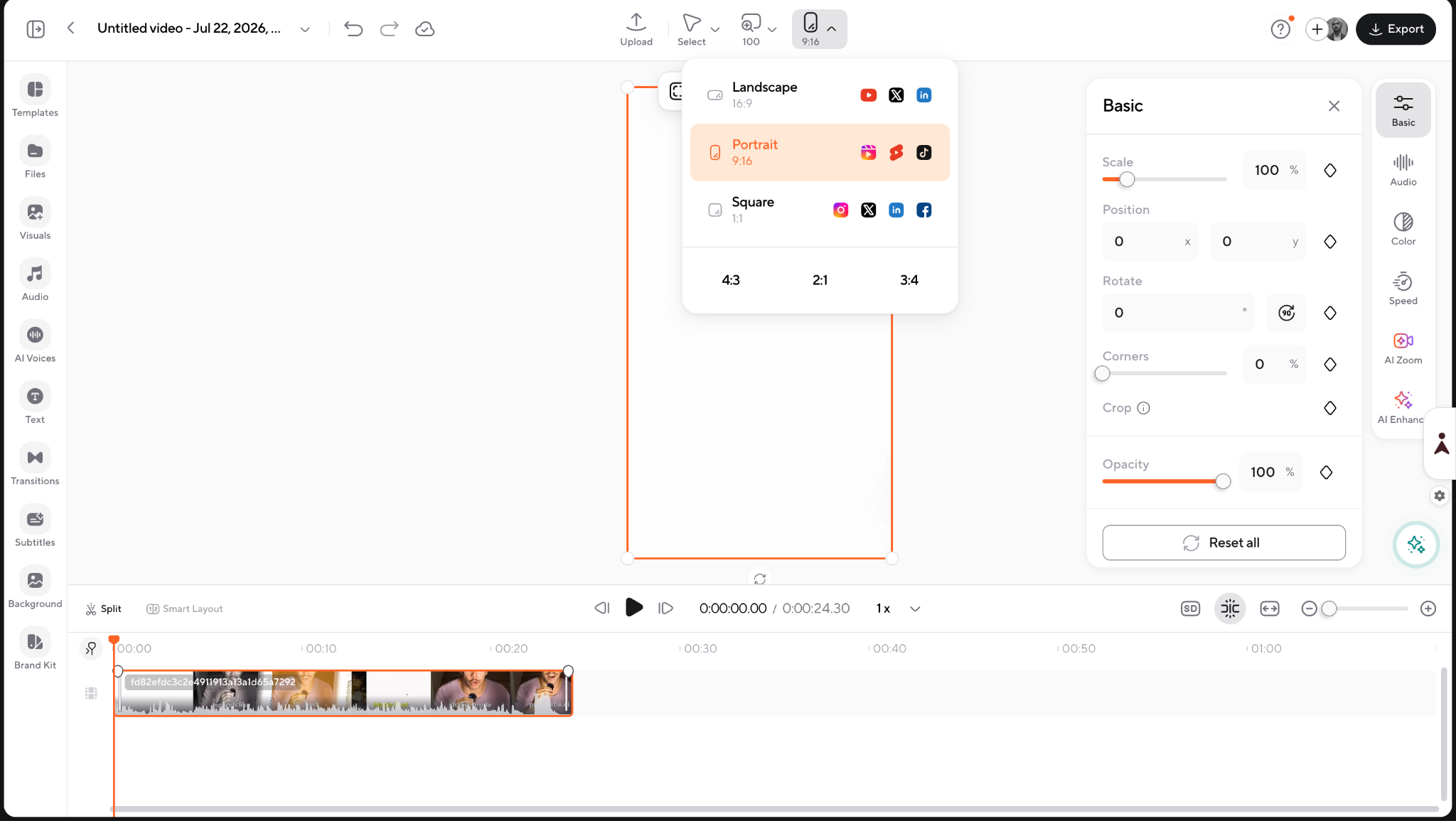
- Resize to 9:16 so it fits the Shorts feed.
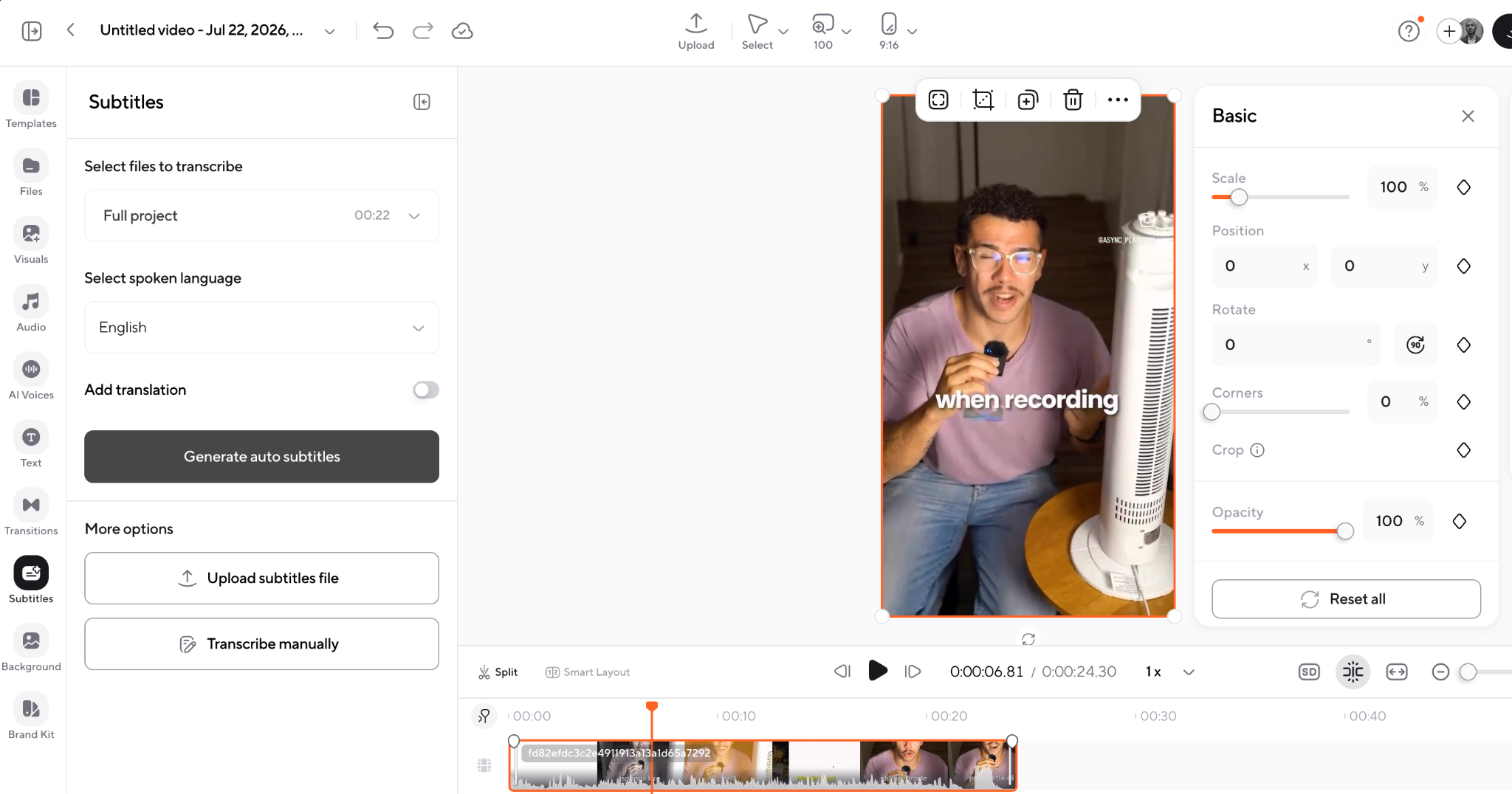
- Add captions and clean up the audio; see how to add subtitles to video if you want to fine-tune them.
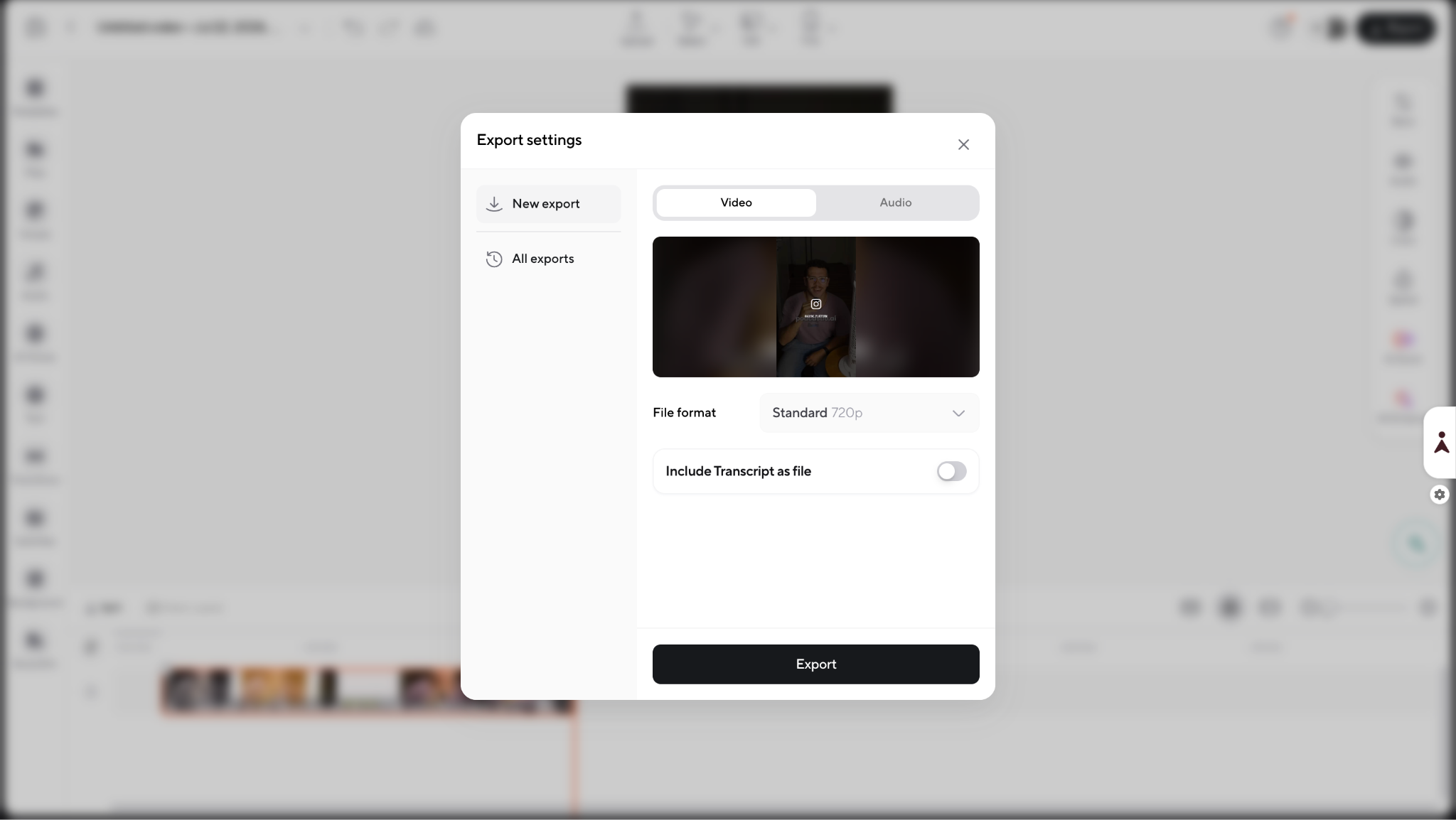
- Trim the video to the length the idea actually needs, not the maximum it is allowed.
- Export and upload through YouTube Studio.
Here is the process in action: https://www.youtube.com/watch?v=yVeFDac1XsI
How the algorithm affects YouTube Shorts
Even though YouTube Shorts are, by definition, short-form videos, the shorts length still influences how they interact with YouTube’s algorithm. The platform’s algorithm considers several factors, such as retention rate, engagement, and viewer completion, to determine which Shorts gain visibility and reach more viewers.
Let’s break down how each of these factors works and what it means for creators.
1) Retention rate: why it’s all about keeping viewers till the end
The retention rate is one of the biggest factors impacting a Short’s performance. YouTube measures how long viewers stick around, and higher retention rates can signal to the algorithm that your content is engaging and worthy of wider distribution. This is especially crucial for short videos, where even a few seconds of drop-off can affect retention metrics. To keep viewers engaged till the very end, it’s key to maintain a fast pace, use appealing visuals, and cut any fluff that doesn’t add value.
2) Completion rate: aiming for 100% watch-throughs
Even for short videos, completion rate is just as important as retention. YouTube rewards videos that viewers watch from start to finish, as it indicates high engagement. For Shorts, aiming for 100% completion can be a realistic goal since they’re naturally brief. Creators should aim to front-load their videos with the most engaging content to capture attention right away. When viewers finish a video, they’re more likely to replay it or explore more of your content, both of which can boost your Shorts’ visibility.
3) Engagement: why likes, comments, and shares matter
Engagement metrics, likes, comments, and shares, are also crucial for helping the algorithm pick up on high-performing content. For short videos, especially, you can encourage viewers to interact by asking questions, prompting them to like or comment, or even adding short captions that spark responses. The more interactions a Short receives, the more likely it is to be promoted by the algorithm, as engagement signals indicate that viewers find the video worth their time.
4) Length vs. algorithm favor: striking the perfect balance
While you may wonder, “how long can YouTube Shorts be?” the sweet spot isn’t always 30 to 60 seconds. Shorts that are too long might lose viewers, but too-short videos may not deliver a complete message. Finding the right shorts length means balancing viewer interest and message impact. Experimenting with 10-30 second Shorts, for example, may help achieve a solid blend of engagement, retention, and completion—ultimately getting the algorithm’s attention and boosting reach.
By understanding and optimizing these factors, you can design their Shorts to work with, not against, YouTube’s algorithm, making the most of every second to maximize reach and engagement
YouTube Shorts can be Monetized at Any Lentgh
Want to get some income out of your shorts? You can! YouTube Shorts can be monetized, and the platform is continuing to expand monetization options specifically for Shorts creators.
While monetizing Shorts works a little differently than traditional long-form videos, there are still plenty of opportunities to turn your content into revenue.
- YouTube Shorts Fund (now evolving into ad revenue sharing): Initially, YouTube introduced the Shorts Fund, a pool of money paid out to top-performing Shorts creators. However, as of 2023, YouTube shifted toward integrating Shorts into the broader Partner Program, allowing creators to earn ad revenue directly from Shorts ads.
- Ad revenue sharing: If you’re part of the YouTube Partner Program (YPP), you can now earn a share of ad revenue generated from ads shown between Shorts in the Shorts Feed. This gives creators a more consistent and scalable way to monetize viral content.
- Super Thanks and other fan funding: YouTube also allows eligible Shorts creators to earn through features like Super Thanks, where viewers can tip directly. This adds another revenue stream that supports your channel’s growth.
- Brand partnerships and sponsorships: Because Shorts can rack up millions of views quickly, they’re an attractive format for brands looking to reach large audiences. Many creators monetize their Shorts by partnering with brands for sponsored content, product placements, or affiliate marketing.
- Driving traffic to monetized content: Shorts can also act as a discovery tool that funnels viewers to your longer-form videos, live streams, or memberships, all of which can generate additional income.
While Shorts might not generate as much revenue per view as longer videos initially, the potential for virality and massive reach can make them a powerful part of your overall monetization strategy.
FAQ
Can a YouTube Short be longer than 60 seconds?
Yes. The original 60-second cap no longer applies. A Short can now run up to three minutes, provided it is filmed vertically or square and uploaded on or after October 15, 2024. Anything longer than three minutes is treated as a regular long-form video instead.
Can YouTube Shorts be three minutes long?
Yes. Three minutes is the current maximum for a qualifying video. Just remember that the limit is a ceiling, not a target, most Shorts perform better well under it. Use the full three minutes only when the idea genuinely needs that much time to land.
What is the maximum length of a YouTube Short?
Three minutes. Any qualifying vertical or square video uploaded on or after October 15, 2024 can run up to that limit and still be treated as a Short. Go over three minutes, and YouTube classifies the upload as standard long-form content on the Watch page instead.
What is the minimum length of a YouTube Short?
There is no published minimum duration. Even a clip of a few seconds can qualify and appear in the Shorts feed. The practical limit is attention rather than policy: a very short video still needs enough substance to make viewers stop scrolling, react, or replay it.
What is the best length for a YouTube Short?
Whatever completes the idea without padding. Quick jokes and loops work under 15 seconds, single tips fit 15-30 seconds, demos and short tutorials suit 30–60 seconds, and stories or deeper explainers use 60-180 seconds. As a rule, pick the shortest length that lets the idea land.
Can I monetize a three-minute YouTube Short?
Yes, as long as your channel is accepted into the YouTube Partner Program and the Short carries no unresolved Content ID claims. Length itself does not affect eligibility, a three-minute Short is treated the same as a 20-second one. Earnings are based on engaged views, not raw view counts.
Can I use copyrighted music in a three-minute Short?
Carefully. Most Shorts Audio Library tracks are clear for up to 90 seconds, and some only 30 or 60. Any Short over one minute with an active Content ID claim is blocked globally, regardless of policy, so original or royalty-free audio is the safer choice for longer Shorts.
Why is my video not showing as a Short?
Several things can cause this: the video runs longer than three minutes, uses landscape format, or was uploaded before October 15, 2024. It may also still be processing, carry an active Content ID claim while over one minute, or use an unsupported aspect ratio.
Can I upload a three-minute Short from desktop?
Yes. Upload a vertical or square file through YouTube Studio, and it will publish as a Short automatically, as long as it meets the format and length requirements. You do not need to toggle any setting. YouTube categorizes it based on aspect ratio, duration, and upload date.
PakarPBN
A Private Blog Network (PBN) is a collection of websites that are controlled by a single individual or organization and used primarily to build backlinks to a “money site” in order to influence its ranking in search engines such as Google. The core idea behind a PBN is based on the importance of backlinks in Google’s ranking algorithm. Since Google views backlinks as signals of authority and trust, some website owners attempt to artificially create these signals through a controlled network of sites.
In a typical PBN setup, the owner acquires expired or aged domains that already have existing authority, backlinks, and history. These domains are rebuilt with new content and hosted separately, often using different IP addresses, hosting providers, themes, and ownership details to make them appear unrelated. Within the content published on these sites, links are strategically placed that point to the main website the owner wants to rank higher. By doing this, the owner attempts to pass link equity (also known as “link juice”) from the PBN sites to the target website.
The purpose of a PBN is to give the impression that the target website is naturally earning links from multiple independent sources. If done effectively, this can temporarily improve keyword rankings, increase organic visibility, and drive more traffic from search results.
