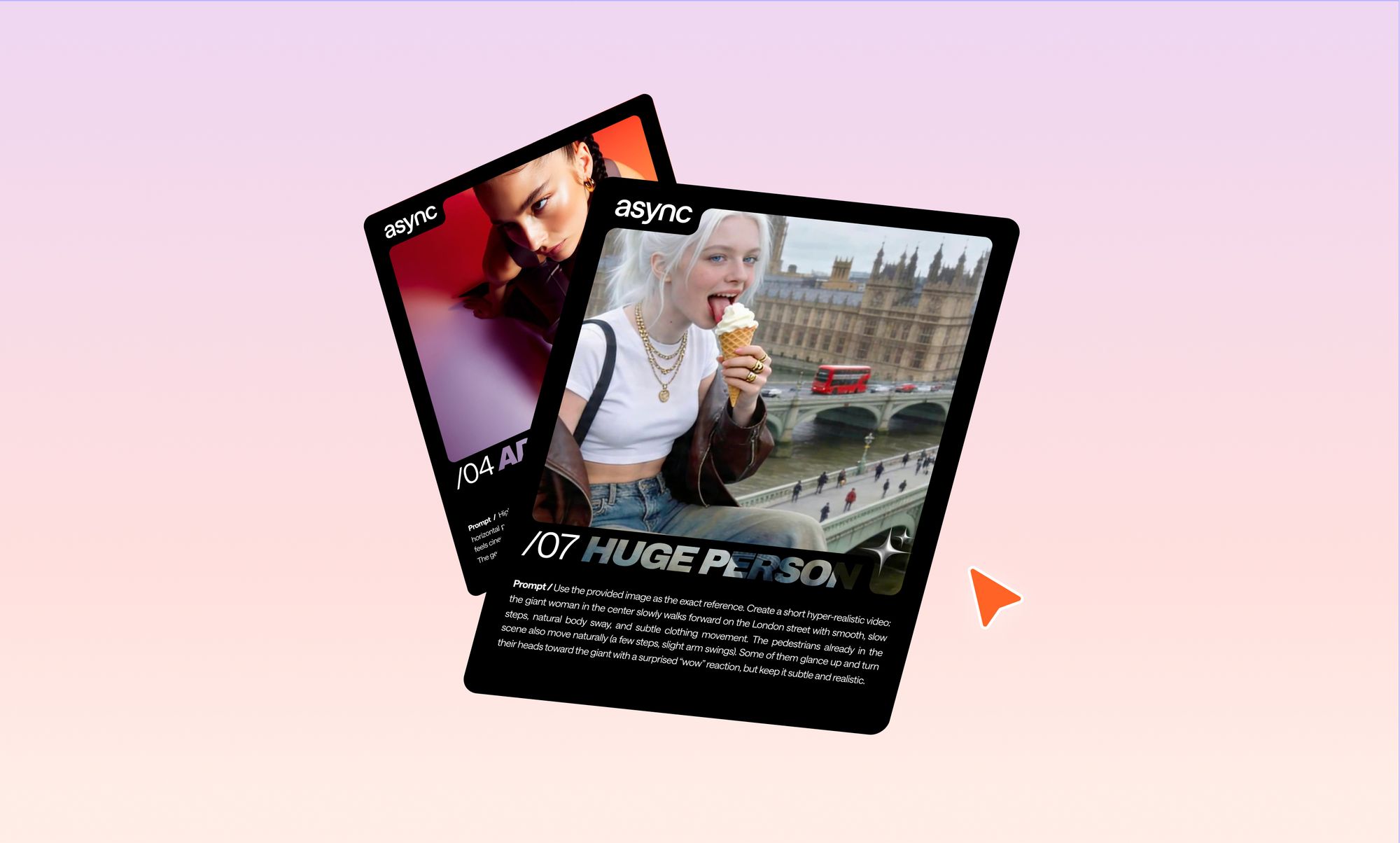
AI video prompts are the instructions you give to an AI tool to generate or animate a video.
The difference between an average result and something that looks genuinely cinematic usually comes down to how well that prompt is written. In this guide, you’ll find 10 viral-ready AI video prompts you can copy, plus a simple framework to help you create your own.
If you’ve been experimenting with AI video tools lately, you’ve probably noticed something frustrating. You can use the same image, the same idea, even the same tool, and still end up with completely different results. Sometimes it looks incredible. Other times… not so much.
That’s not random. It’s the prompt.
The way you describe motion, camera, lighting, and what should stay unchanged has a huge impact on how the AI interprets your request. Small details like saying “slow, natural movement” instead of just “move,” or “no camera motion” instead of leaving it open, can completely change the output.
In this article, we’re not just giving you prompts to copy. We’re also showing you why they work, so you can tweak them, combine them, and start creating your own ideas without guessing.
Here’s what you’ll get:
- 10 viral AI video prompts based on real high-performing effects
- A simple formula you can reuse for any video idea
- Practical tips to get more consistent, realistic results
Let’s start with the basics before jumping into the prompts.
What are AI video prompts?
AI video prompts are structured text instructions that tell a video generation model what to create, animate, or preserve. Instead of editing footage manually, you describe the scene in words, and the AI translates that into motion, visuals, and timing.
Most modern tools like Runway ML or Pika Labs work by combining image understanding with motion prediction. That means your prompt isn’t just describing what something looks like, but also how it should behave over time.
There are two common types of AI video prompts you’ll see:
1. Image-to-video prompts: You start with an existing image and tell the AI how to animate it.
Example: adding motion, camera movement, or subtle environmental changes while keeping everything else exactly the same.
2. Text-to-video prompts: You describe the entire scene from scratch.
Example: a person walking through a city at sunset with cinematic lighting and a slow camera track.
What makes AI video prompts different from regular image prompts is the added dimension of time. You’re not just defining a scene, you’re directing it.
That’s why strong prompts usually include:
- what should move and how
- what should stay unchanged
- how the camera behaves
- the overall style and mood
Even small details matter. Saying “the subject remains completely still” or “the camera is fixed with no movement” can be the difference between a clean, realistic result and something that feels chaotic or over-processed.
How to write better AI video prompts (that actually work)
If you’ve ever typed a quick prompt and hoped for the best, you’ve already seen how inconsistent AI video results can be. The difference between something that looks random and something that feels intentional usually comes down to structure.
Strong prompts aren’t longer. They’re clearer.
Instead of describing everything at once, think of your prompt as a set of instructions that the AI follows step by step.
The core prompt formula
A simple way to approach this is:
Subject + action + environment + motion + camera + style + constraints
You don’t need to overthink it, but including each of these elements gives the AI enough direction to produce a controlled result.
- Subject → who or what is in the scene
- Action → what they are doing
- Environment → where the scene takes place
- Motion → how things move (speed, behavior, physics)
- Camera → how the scene is filmed
- Style → visual tone (cinematic, realistic, editorial, etc.)
- Constraints → what must not change
What each part looks like in practice
Let’s take a simple idea and build it properly.
Basic prompt:
A woman walking in the city
This leaves too much open for interpretation.
Improved prompt:
A woman walks forward through a busy city street at sunset, with natural body movement and subtle clothing motion. The environment remains realistic with soft, warm lighting. The camera is handheld with slight natural shake, following eye level. Cinematic style, shallow depth of field. Do not change the subject’s face, outfit, or background.
Now the AI knows:
- what’s happening
- how it should move
- how it should look
- what must stay consistent
Why this structure works
AI video models are sensitive to ambiguity. If you don’t specify something, the model fills in the gaps on its own, and that’s where things usually go wrong.
Adding clear motion, camera, and constraint instructions reduces that randomness and gives you more control over the final result.
Why most AI video prompts fail (and how to fix them)
This is the part most people skip. They assume bad AI video results come from a weak model, but a lot of the time, the issue is the prompt itself.
AI video tools are getting much better at realism and control. Google describes Veo as offering improved prompt adherence and more creative control, while OpenAI’s Sora guide says more specific prompts generally give you more control and consistency. But even with stronger models, video is still much harder than image generation because the model has to keep a scene believable across time, not just in a single frame. Benchmark research backs that up: VBench evaluates video generation across 16 different quality dimensions, including subject consistency, temporal flickering, motion smoothness, and dynamic quality.
That is why a prompt can sound creative in your head and still produce something awkward on screen.
It asks for motion without controlling it
A lot of prompts describe the look of the scene, but not the behavior of the scene. Runway’s own text-to-video guide says effective prompts need both visual descriptions and motion descriptions. In other words, what the AI sees is only half the job. It also needs to know how the scene should move and behave.
This is where many weak prompts fall apart. They say things like “make it cinematic” or “animate this image,” but never explain:
- who moves
- what stays still
- how fast the motion should be
- whether the movement is smooth, subtle, dramatic, or chaotic
That missing motion logic is often what causes the weird drifting, random gestures, and overactive backgrounds people complain about.
Fix: replace vague verbs with specific motion direction.
Instead of “animate the scene,” say “the woman walks forward with slow, natural body sway while the background remains completely static.”
It gives the model too many jobs at once
This one is not obvious, but it matters a lot. The more separate instructions you cram into one prompt, the more chances the model has to prioritize the wrong thing.
OpenAI’s Sora prompting guide explicitly notes that there is a balance between detailed prompts and leaving room for the model’s interpretation, and that the right balance depends on the goal. That means more words do not automatically equal better results. Sometimes a longer prompt just introduces more competing instructions.
You see this when a single prompt tries to do all of the following at once:
- add character motion
- change camera angle
- create a new background
- preserve face identity
- introduce dramatic lighting
- add multiple secondary moving elements
That is not one task. That is five tasks competing for attention.
Research on video generation quality also reflects how hard this is. In VBench, newer systems can score very highly on some consistency-related dimensions while still struggling badly in others like dynamic quality, spatial relationship, style consistency, or multi-object handling. For example, in the benchmark table, some evaluated models score above 95% on background consistency and temporal flickering, but much lower on dimensions such as multiple objects, spatial relationship, and style temporal consistency.
So yes, your prompt can fail simply because it is asking the model to juggle more than it can reliably hold together.
Fix: focus each prompt on one hero effect. If you want floating cards, make that the star. If you want a drone zoom-out, prioritize camera progression and scene scale. Don’t force three “wow moments” into one clip.
It ignores camera language
This is probably the biggest difference between amateur-looking prompts and strong ones.
Runway recommends structuring prompts with separate attention to scene, subject, and camera movement, and even suggests a format like: [camera movement]: [establishing scene]. [additional details]. Google’s Veo examples also include camera direction directly in the prompt, like “the camera slowly pushes in,” which shows how central camera behavior is to the result.
Why does this matter so much? Because when you leave camera behavior undefined, the model often improvises. And AI improvisation is exactly where clips start to feel messy.
A few examples:
- “No camera movement” helps keep image-to-video generations clean and controlled.
- “Slow orbit around the subject” creates a fashion/editorial feel.
- “Drone lifts upward while pulling backward” gives the model a clear spatial transition.
- “Handheld with slight natural shake” adds realism without inviting chaos.
Without those instructions, the output may still move, but not in a way that supports the idea.
Fix: treat camera direction as part of the prompt, not an optional extra. If motion is the choreography, the camera is the storytelling.
It doesn’t protect what should stay unchanged
This is one of the smartest prompt habits you can build, especially for image-to-video generations.
OpenAI’s video generation docs recommend using image references and reusable character assets for stronger visual consistency across generations. That is basically the platform-level version of a prompt technique creators already use manually: tell the model what it must preserve.
In practice, that means lines like:
- “Do not change the subject’s face, outfit, or background.”
- “The environment remains exactly the same.”
- “Only the birds animate.”
- “The camera is fixed.”
This kind of wording matters because video models are not just generating one perfect frame. They are continually predicting what the next frame should look like. If you do not lock parts of the scene, the model has more freedom to “help,” and that often means changing things you never wanted touched.
There is a reason VBench treats consistency as multiple separate dimensions, not one. It breaks quality down into subject consistency, background consistency, temporal flickering, and temporal smoothness because these are distinct failure points in the generated video.
Fix: whenever your concept depends on one standout effect, explicitly freeze the rest of the scene.
It uses style words that sound good but direct nothing
Words like “cinematic,” “viral,” or “aesthetic” are useful, but only when they are supported by actual visual instructions.
On their own, they are too abstract. Runway’s prompting docs emphasize concrete scene and camera structure, while Google’s image and video prompting materials consistently push users toward details like subject, setting, style, and shot behavior instead of vague mood-only phrasing.
So instead of stopping at:
cinematic, beautiful, high quality
You get much better results with:
high-fashion editorial style, soft neutral tones, 35mm film look, shallow depth of field, slow orbit camera
The second version gives the model visual decisions it can actually act on.
Fix: Use style language as a finishing layer, not the whole prompt.
A quick way to spot a weak prompt
If your prompt does not clearly answer these questions, it probably needs work:
- What is the main subject?
- What exactly moves?
- What stays still?
- What does the camera do?
- What visual style should the output follow?
- What must not change?
If two or three of those are fuzzy, the result usually will be too.
The good news is that most bad prompts are not bad because the idea is weak. They fail because the instructions are incomplete. Once you start writing with motion, camera, and constraints in mind, your results usually become more consistent very quickly. That is exactly why the prompts in the next section are written the way they are.
10 AI video prompts for viral effects
This is where things get practical. Below are 10 AI video prompts based on real viral-style effects. Each one is structured to give the model clear instructions for motion, camera behavior, and what should stay unchanged, so you get more consistent and realistic results.
You can copy these directly or use them as a base and tweak details like environment, subject, or style.
1. Frozen time effect
Best for: fashion edits, cinematic reels, storytelling
Use this when you want: a high-end “everything stops except me” moment
Prompt:
🎥 VIDEO PROMPT: Geneate an Instagram portrait size video of the woman in the attached image. She looks directly at the camera while walking. As she snaps her fingers, everything around her instantly freezes in place -people mid-step, hair and clothing suspended in motion, a brid frozen mid-flight with wings fully extended. The camera smoothly orbits around her as she continues moving naturally through the frozen scene. She interacts playfully:gently pokes the frozen bird mid-airwalk past frozen pedestrians (side profile shot, editorial fashion framing, soft lighting, slow motion feel). She then turns back to face the camera, maintaining a confident, high-fashion expression. She snaps her fingers again. Instantly, the world resumes motion seamlessly – pedestrians continue walking, bird flies away, environment comes back to life.She keeps walking forward. Style: high fashion editorial, Vogue-style, cinematic, smooth camera motion, 35mm film look, natural skin texture, minimal color grading, neutral tones Camera: steadycam tracking, siow orbit, medium to close-up transitions Mood: confident, effortless, slightly playful, polished Environment: busy modern city street, realistic crowd density, urban lifestyle
Why it works: This prompt clearly separates motion and stillness, which is critical for temporal consistency. The AI knows exactly what to freeze and what to animate.
2. Standing on a phone
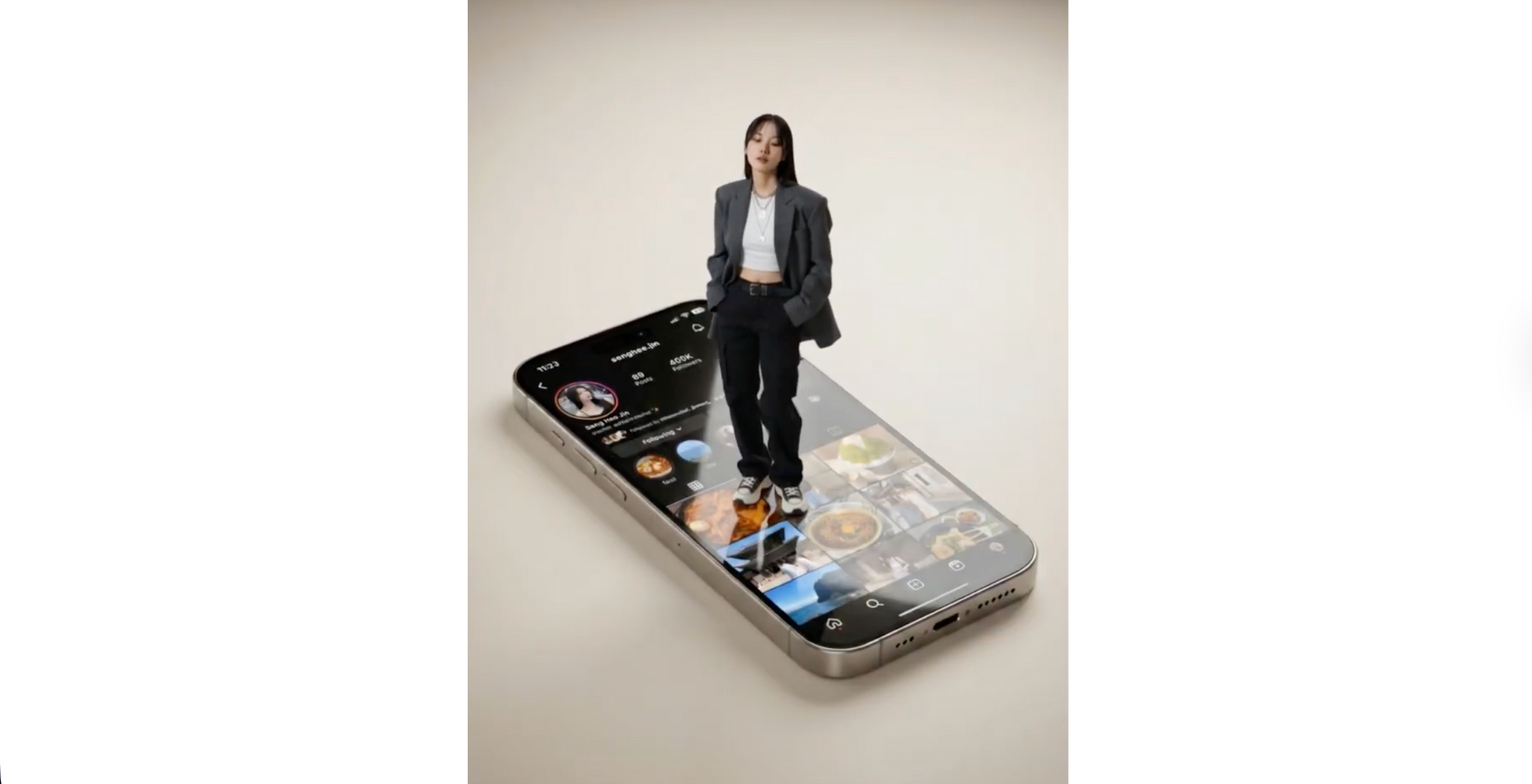
Best for: product-style visuals, tech content
Use this when you want: a premium campaign-style effect
Prompt:
🖼️IMAGE PROMPT:
Create a high-end, photorealistic composite image that feels like a premium fashion-tech campaign.
Use the first reference image as the only source of identity. Accurately preserve the person’s facial structure, body proportions, skin texture, hair, clothes, style and overall likeness. Do not stylize or alter identity.
Use the second reference image strictly as the phone screen UI layout. Recreate its composition, spacing, typography scale, and interface proportions exactly as seen.
The scene is set in a minimal studio environment with soft, neutral tones. Place an iPhone 17 Pro flat in a realistic perspective, slightly angled, with premium metallic edges visible. The phone screen is on and active. The primary subject is physically standing on top of the phone screen, with their feet naturally grounded on the glass surface.
Maintain full identity accuracy. The subject stands in a relaxed, natural pose with a confident, casual posture. Scale the subject realistically so they appear to be standing on a smartphone screen. Ensure accurate contact shadows between the shoes and the glass surface, with believable weight distribution.
The outfit of the woman should stay exactly the same, nothing should be changed about her as she stands on the phone. Display an Instagram post interface on the phone screen. Place the second reference image precisely onto the screen as if Instagram is open. Ensure realistic glass reflections, screen glare, brightness falloff, and OLED contrast. The screen content must follow the phone’s physical perspective and curvature.
Lighting should include a soft studio key light from the upper left and gentle fill light to preserve shadow detail. Include realistic reflections on the phone glass and metallic edges. Shadows cast by the subject onto the screen must be physically accurate.
Use a slightly elevated three-quarter camera angle with a 50mm lens and moderate depth of field, keeping both the subject and phone sharp. The final image must achieve true photographic realism, with no CGI, illustration, or artificial look.
Ensure ultra-high realism, high resolution, no artifacts, no cartoon or anime style, and no surreal distortion.
The final result should look like a real premium product campaign photo for a high-end fashion and tech collaboration.
🖼️IMAGE PROMPT:
Replace the screen of the phone with the new screenshot I’ve attached. Everything else about the base image should stay exactly the same, no location, lighting or style changes.
🎥 VIDEO PROMPT:
Use these two images as the starting and ending points. The woman on top of the phone looks around in a cool way and stands naturally, the image on the phone screen scrolls upward and a new image appears, which is the screenshot on the second image. No camera movement, just a static view.
Why it works: It isolates two motions only: the subject’s micro-movement and the UI scroll. That clarity prevents distortion and keeps the illusion realistic.
3. No-drone zoom out
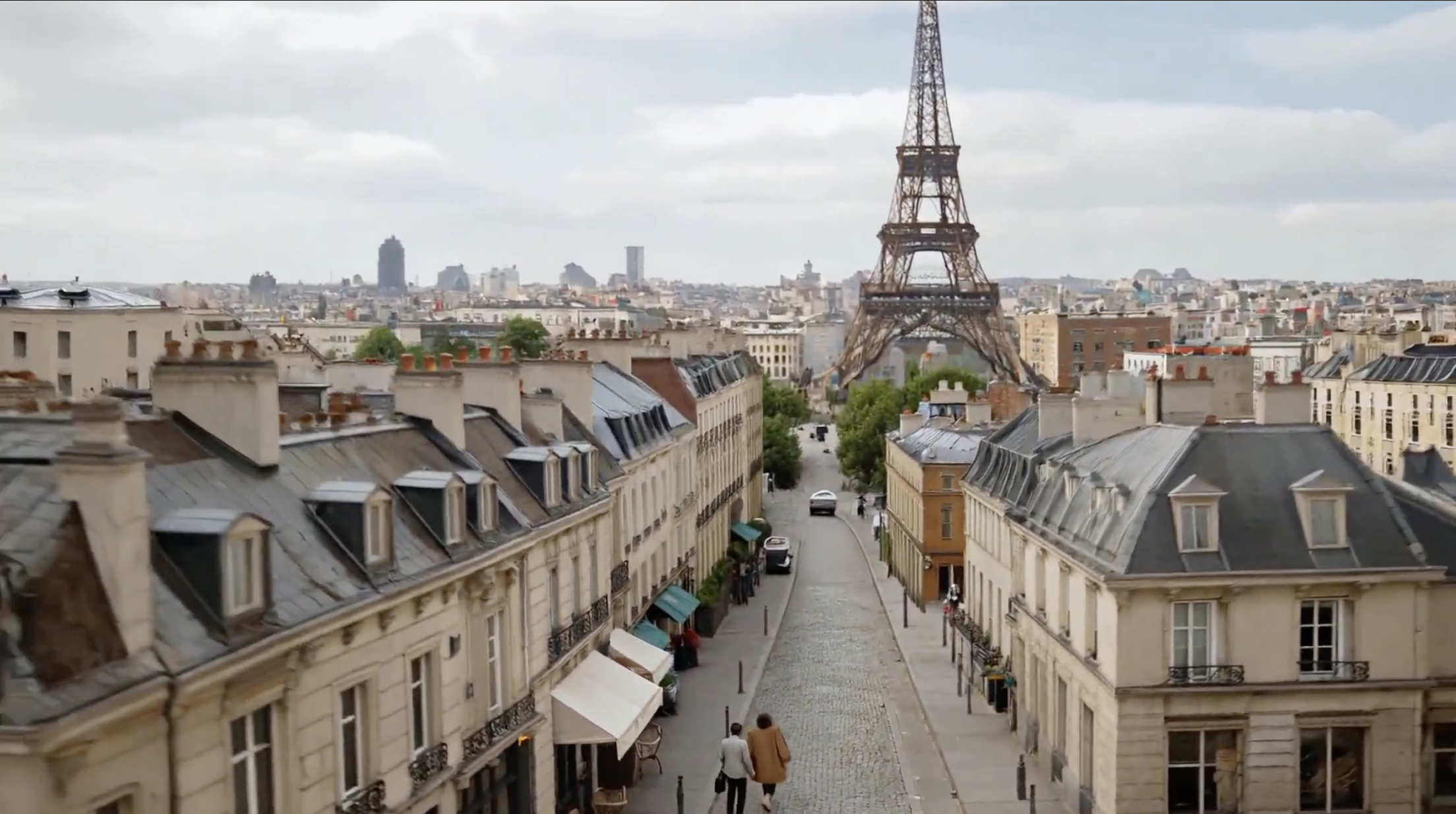
Best for: travel-style content, cinematic transitions
Use this when you want: a dramatic reveal from close-up to aerial
Prompt:
🎥 VIDEO PROMPT:
Use the provided image as the exact starting frame. Preserve faces, proportions, clothing and architectural accuracy. Maintain full realism.
Total duration: 8-9 seconds.
Seconds 0-1.5: The couple continues walking naturally, slight forward movement. Subtle wind in hair and dress. Cinematic handheld feel.
Seconds 1.5-3: Sudden smooth drone lift upward while pulling backward. Perspective widens quickly but naturally. No distortion.
Seconds 3-6: Drone rises above rooftops, revealing classic Paris Haussmann buildings. The Eiffel Tower becomes more centered in the frame.
Seconds 6-9: Transition into a high aerial Paris skyline view. The couple becomes small in frame.
Realistic urban depth haze. Authentic drone motion.
Style: Ultra-realistic drone footage. Natural motion blur. No morphing. No warped buildings.
Overcast Paris lighting. 24mm aerial lens look.
Why it works: Breaking motion into time segments gives the AI a timeline, which improves motion coherence and avoids abrupt transitions.
4. Giant person in the city
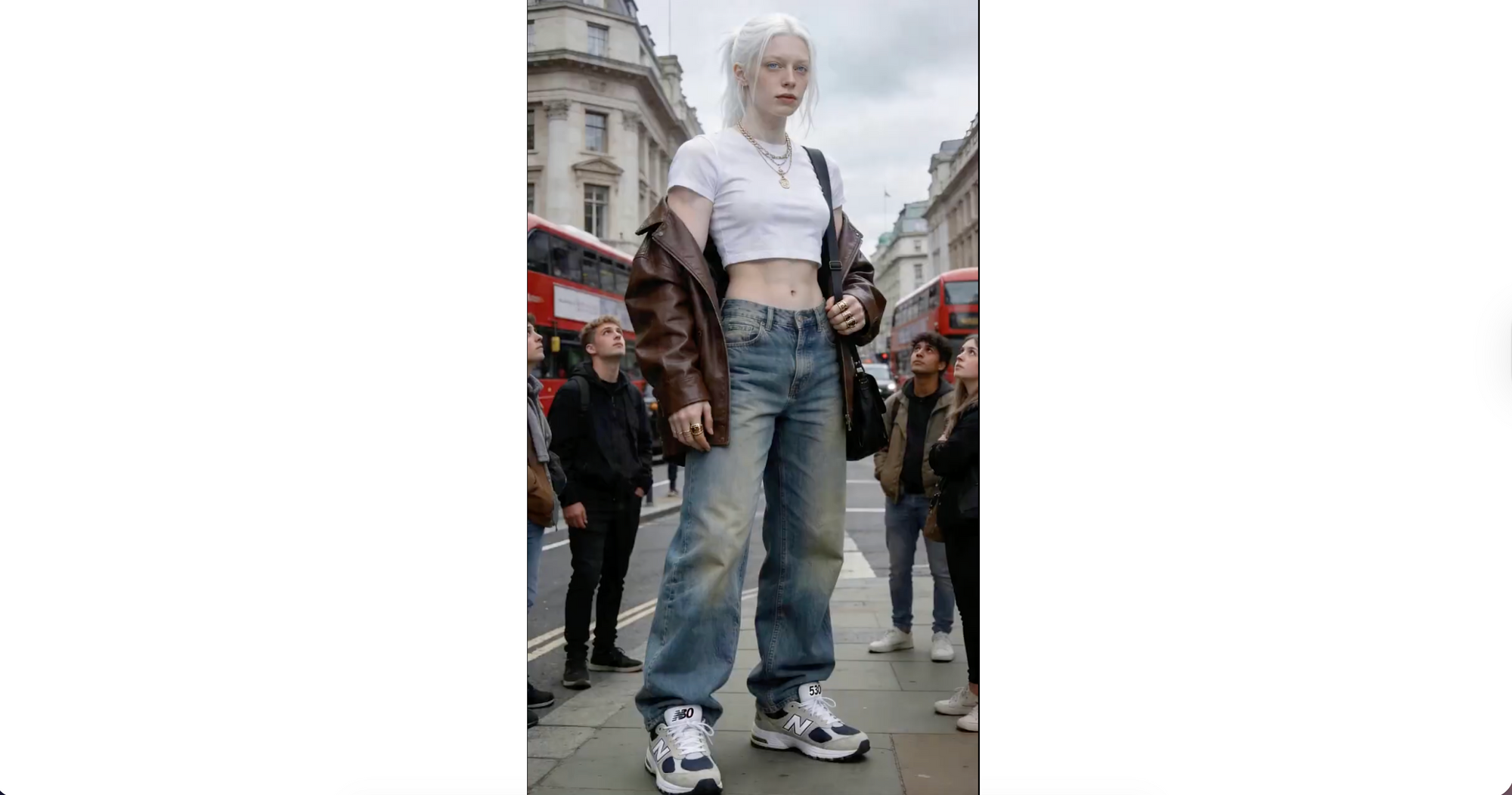
Best for: surreal realism, viral edits
Use this when you want: a believable “impossible” scene
Prompt:
🎥 VIDEO PROMPT: Use the provided image as the exact reference. Create a short hyper-realistic video: the giant woman in the center slowly walks forward on the London street with smooth, slow steps, natural body sway, and subtle clothing movement. The pedestrians already in the scene also move naturally (a few steps, slight arm swings). Some of them glance up and turn their heads toward the giant with a surprised “wow” reaction, but keep it subtle and realistic. Keep the same overcast sky, soft diffused light, and the background buildings unchanged. Make it look as natural and realistic as possible, don’t change anything about the main character. She can smile as she walks, too, or wave.
Why it works: The realism comes from subtlety. Instead of exaggeration, the prompt emphasizes natural human behavior and restrained reactions.
5. Surreal balloon takeover
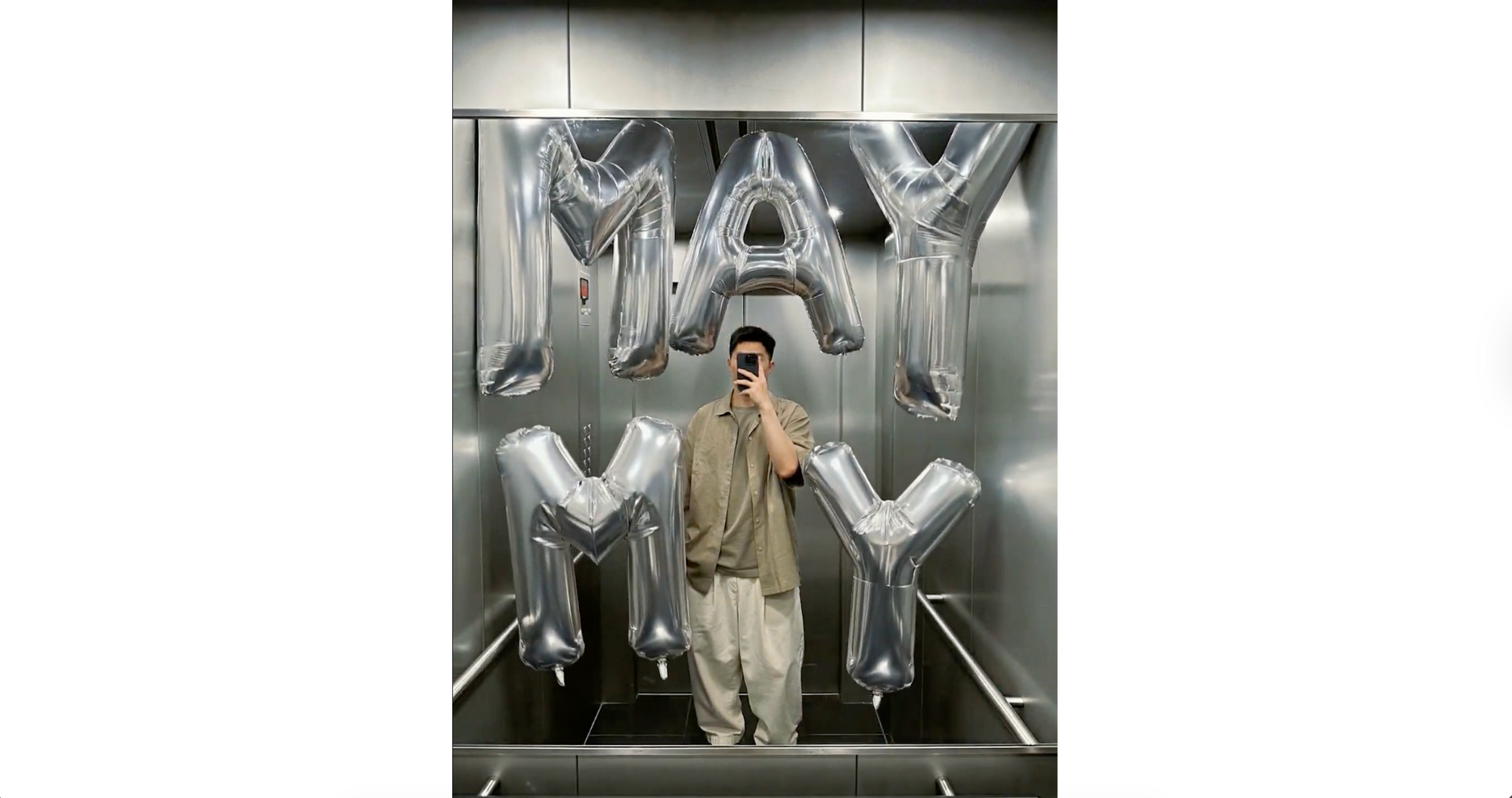
Best for: branded visuals, creative concepts
Use this when you want: a surreal but grounded effect
Prompt:
🖼️IMAGE PROMPT:
Using the attached image as the exact base, preserve the entire original location unchanged, no changes to architecture, layout, lighting, colors, perspective, or existing objects. The photo must remain fully intact and recognizable. Only add a giant, almost surreal inflatable MY MAY into the scene. Each letter or digit is a separate oversized inflatable object, individually placed and scaled, far larger than human size. All characters are bright foil silver, glossy, made of thick inflatable material with visible seams, soft wrinkles, and realistic air pressure deformation. The individual inflatable MY MAY aggressively fills and overwhelms the space, pressing against walls, ceiling, floor, and furniture. Each character bends, squeezes, and deforms naturally where it makes contact, with believable weight, spacing, and depth, while maintaining correct perspective.
🎥 VIDEO PROMPT:
Static camera, completely locked off, no camera movement at all. The elevator interior and the person remain completely still and unchanged throughout. The giant glossy silver inflatable balloon letters M, Y, M, A, Y float upward from the bottom of the frame, rising smoothly into their final positions in the elevator space. Each letter drifts up independently at slightly different speeds, gently bobbing and swaying as they ascend like real helium balloons. Once they reach their positions, they settle with subtle floating motion, gently swaying left and right. The movement is calm, smooth, and natural — realistic balloon physics with gentle left-right drift as they rise. No aggressive motion.
Why it works: The contrast between a static environment and controlled floating motion makes the surreal element feel believable.
6. Pixar twin effect
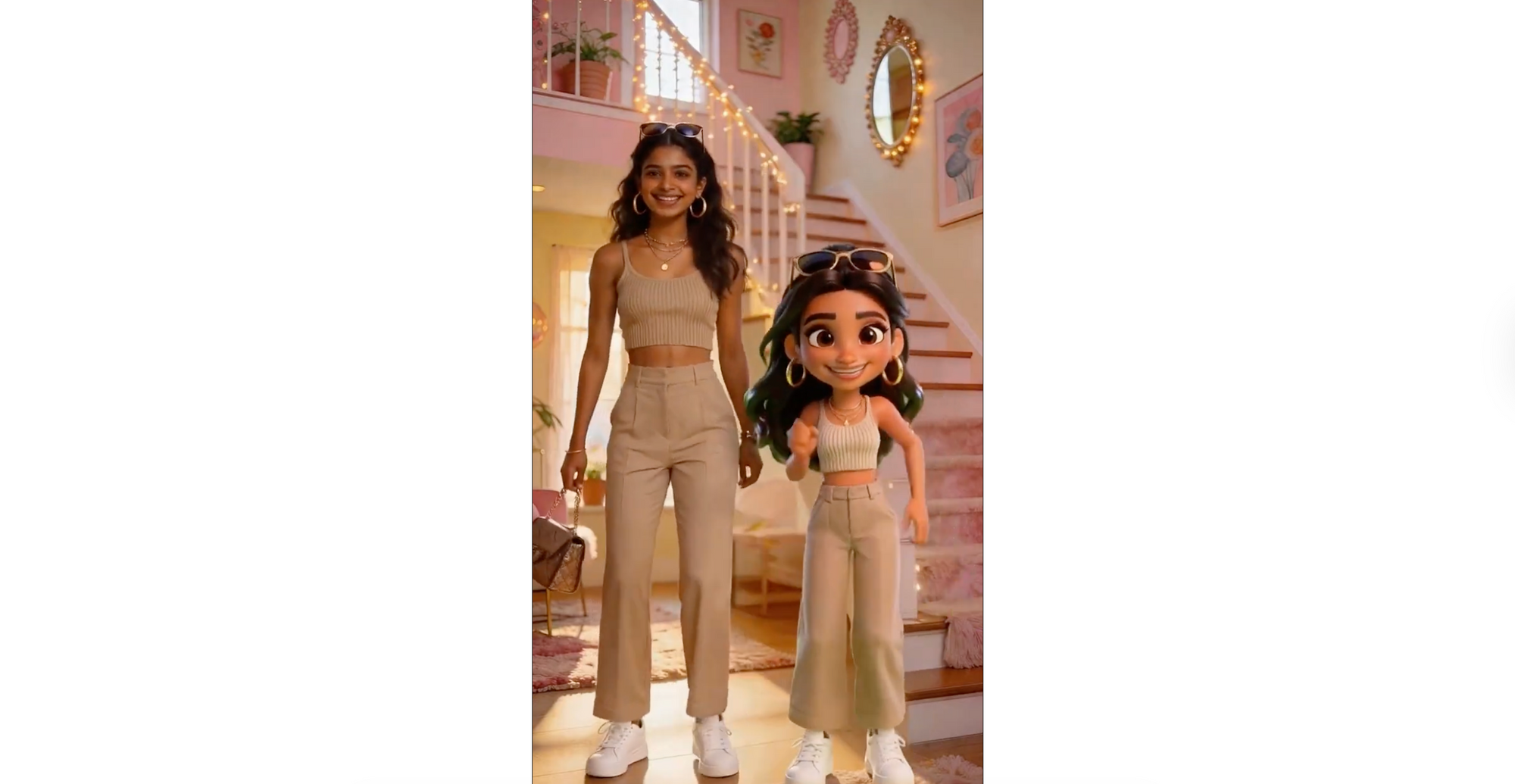
Best for: social content, playful edits
Use this when you want: a stylized character interaction
Prompt:
🖼️IMAGE PROMPT 1: Generate a 3D Disney Pixar-style full-body clone of the exact same girl in the attached photo. Same warm brown skin, large expressive dark brown eyes, long dark hair with a plastic sheen. The character should be the exact same clone of the girl with the same exact outfit. The background is Pure green with no shadows, no gradients, perfect for easy cutout.
🖼️IMAGE PROMPT 2: Take the realistic girl from the first image and place her 3D Pixar doll from the second image standing right next to her on her right side. The real girl must stay completely unchanged and photorealistic. Same pose, same expression, same everything. The Pixar doll should be placed standing next to her at the same height, keeping her 3D Pixar animated style with smooth plastic-like skin and large expressive eyes, same outfit, same pose. The entire home environment stays completely photorealistic and unchanged. Only the doll clone has the Pixar 3D look, the rest is real-life-style. Full-length shot showing both girls from head to sneakers.
🎥 VIDEO PROMPT: Animate this image, make the two characters stand next to each other and dance with exactly the same moves, don’t change anything else, the characters should stay exactly the same, the environment has to stay the same too, the characters are just next to each other moving the same way, with human movements, they can look at each other and wave.
Why it works: It clearly defines style separation while synchronizing motion, which prevents blending errors.
7. 3D music cards effect
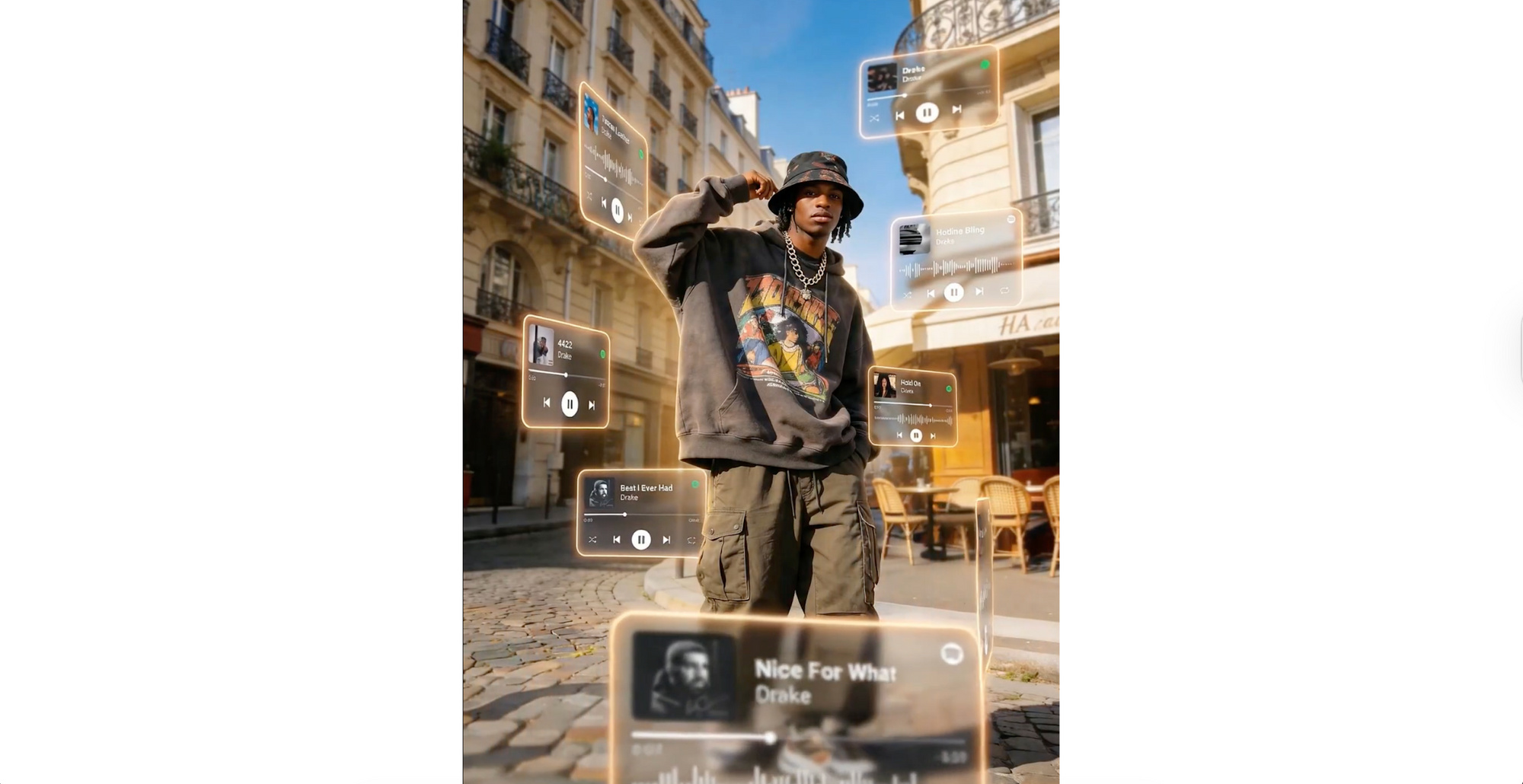
Best for: music content, lifestyle edits
Use this when you want: depth and layered motion
Prompt:
🖼️IMAGE PROMPT: A cinematic, dreamlike AR visual featuring a central 151 photorealistic person surrounded by floating 3D Spotify/Apple Music interface cards. The cards orbit the subject at varying depths-some in the foreground obscuring the figure, others drifting behind. Style: Translucent frosted glass with glowing borders and rounded edges. Lighting: natural tones. Enhance the photo quality Includes depth of field (blurred background cards) and motion accents, highlighting [drake songs] : tuscan leather, hotline bling, 4422, hold on, best i ever had, nice for what, what did i miss, player interfaces.
🎥 VIDEO PROMPT: The central person remains completely still and unmoving like a statue. The floating 3D frosted glass music player cards gently orbit and drift around the character at varying speeds. Some cards slowly rotate, others subtly float up and down, and a few drift laterally. The cards in the foreground have a soft motion blur as they pass. The glowing neon borders on each card pulse faintly with light. The background remains static. Very subtle, elegant motion. The camera is fixed and does not move.
Why it works: Layered foreground and background motion create depth without overwhelming the scene.
8. Disney birds overlay
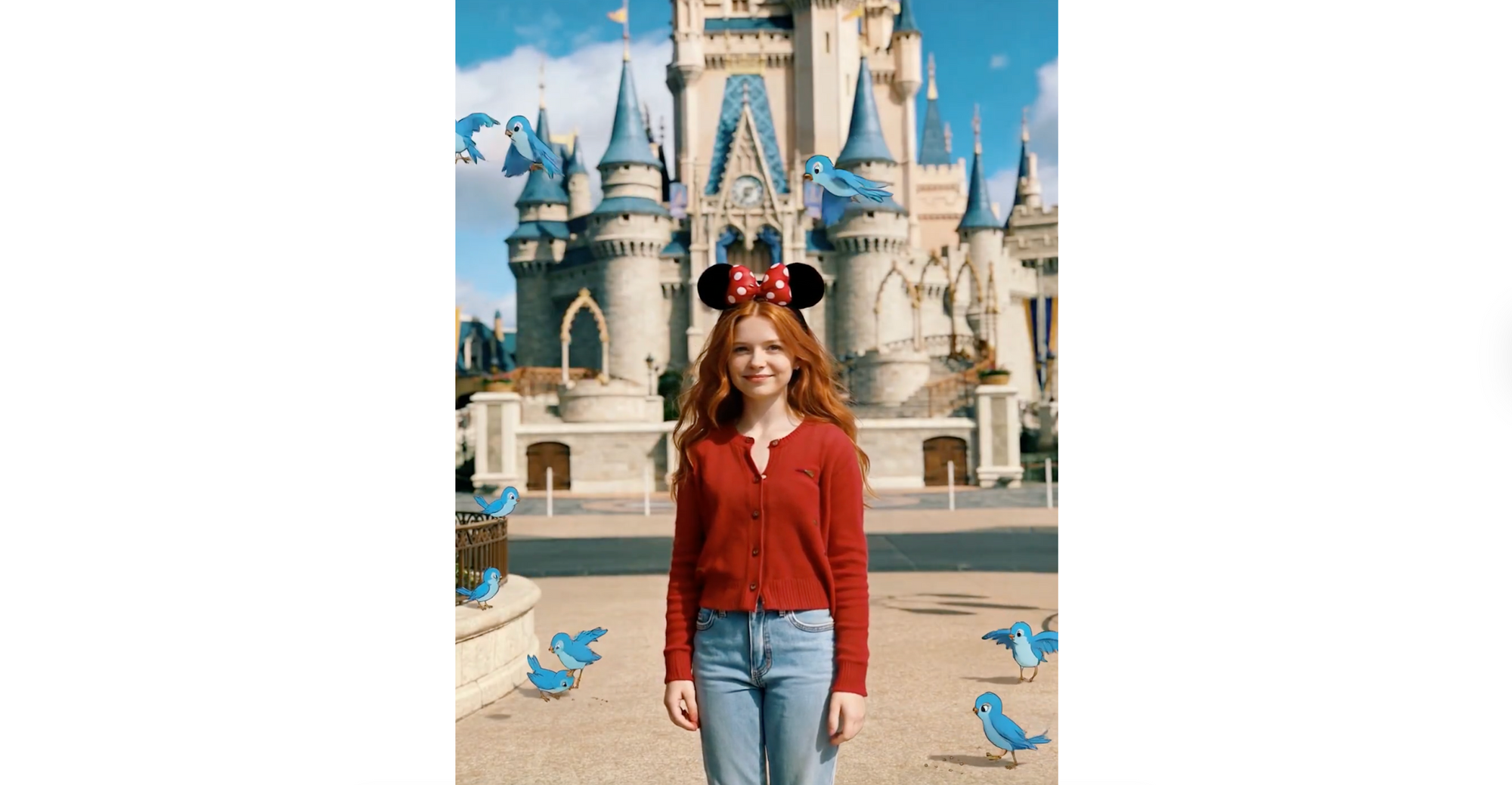
Best for: subtle enhancements, aesthetic edits
Use this when you want: a magical touch without changing realism
Prompt:
🖼️IMAGE PROMPT:
Add Disney-style blue birds sitting and flying around in the scene. Do not change anything else in the attached photo. The character, setting, lighting, and style of the original photo must remain exactly the same.
🎥 VIDEO PROMPT:
Animate the image. Only the Disney-style blue birds should be animated, flying around and picking on the ground. The main character stands completely still like a statue. The realistic setting and lighting remain exactly the same. No camera movement.
Why it works: It limits animation to a single element, which keeps the scene clean and gives a real feel.
9. Swaying building effect
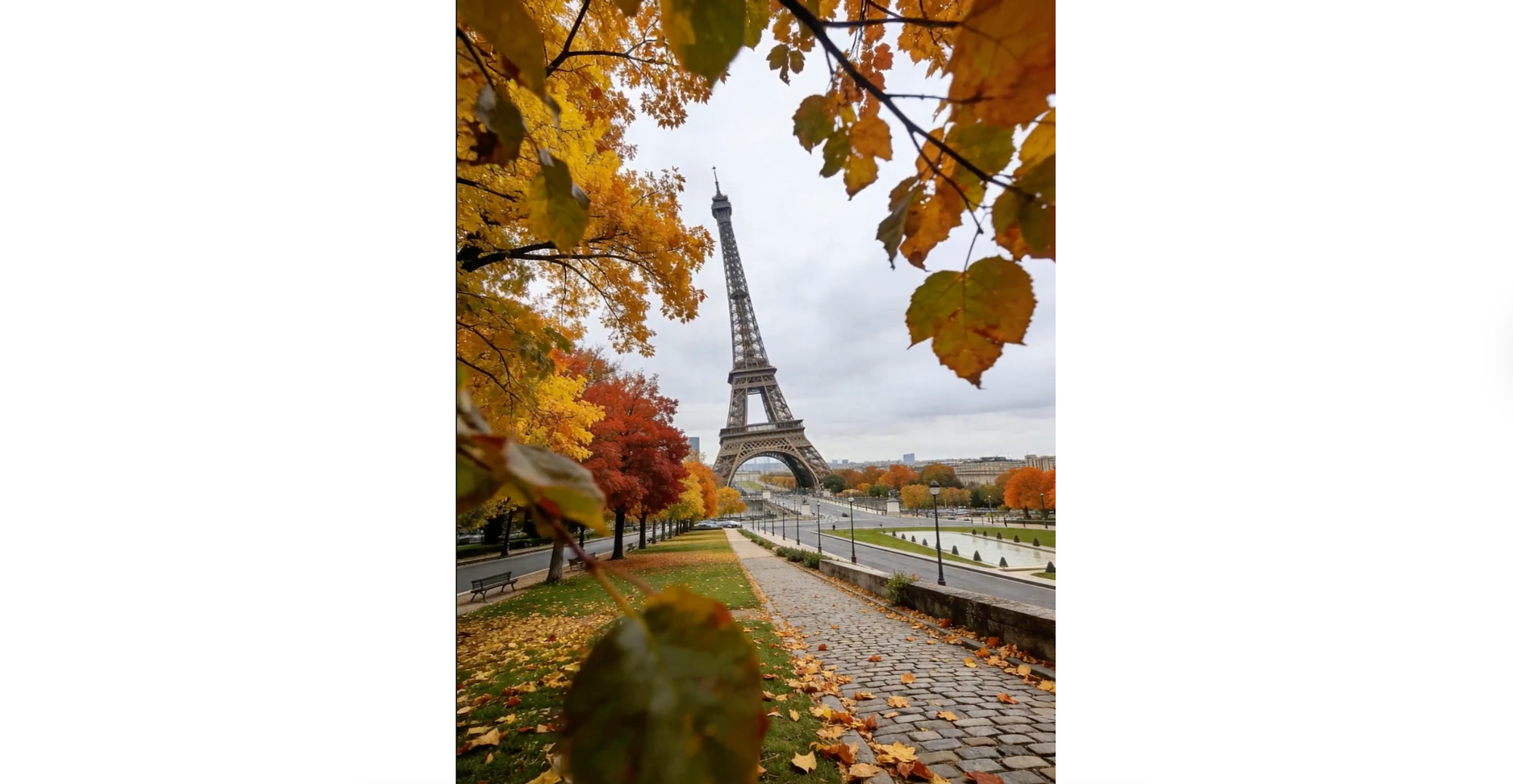
Best for: surreal realism, attention-grabbing visuals
Use this when you want: subtle distortion of reality
Prompt:
🎥 VIDEO PROMPT: The base and foundation of the Eiffel Tower remain completely fixed and anchored to the ground, absolutely no movement at the bottom. The upper half and top of the tower sway and lean inward then outward, left then right, in a continuous rhythmic pendulum motion, like a person slow dancing while standing. The top of the tower gently wavers left, then right, then left, then right, repeating this swaying motion multiple times.
The movement is smooth and graceful, originating from the midsection upward. The autumn trees and leaves around flutter gently in the breeze. The ground, paths, sky, and everything else remain completely static and unchanged. ONLY the Eiffel Tower animates. Camera is fixed.
Why it works: Anchoring the base prevents the scene from collapsing visually, making the surreal motion feel physically grounded.
10. Ad in the clouds
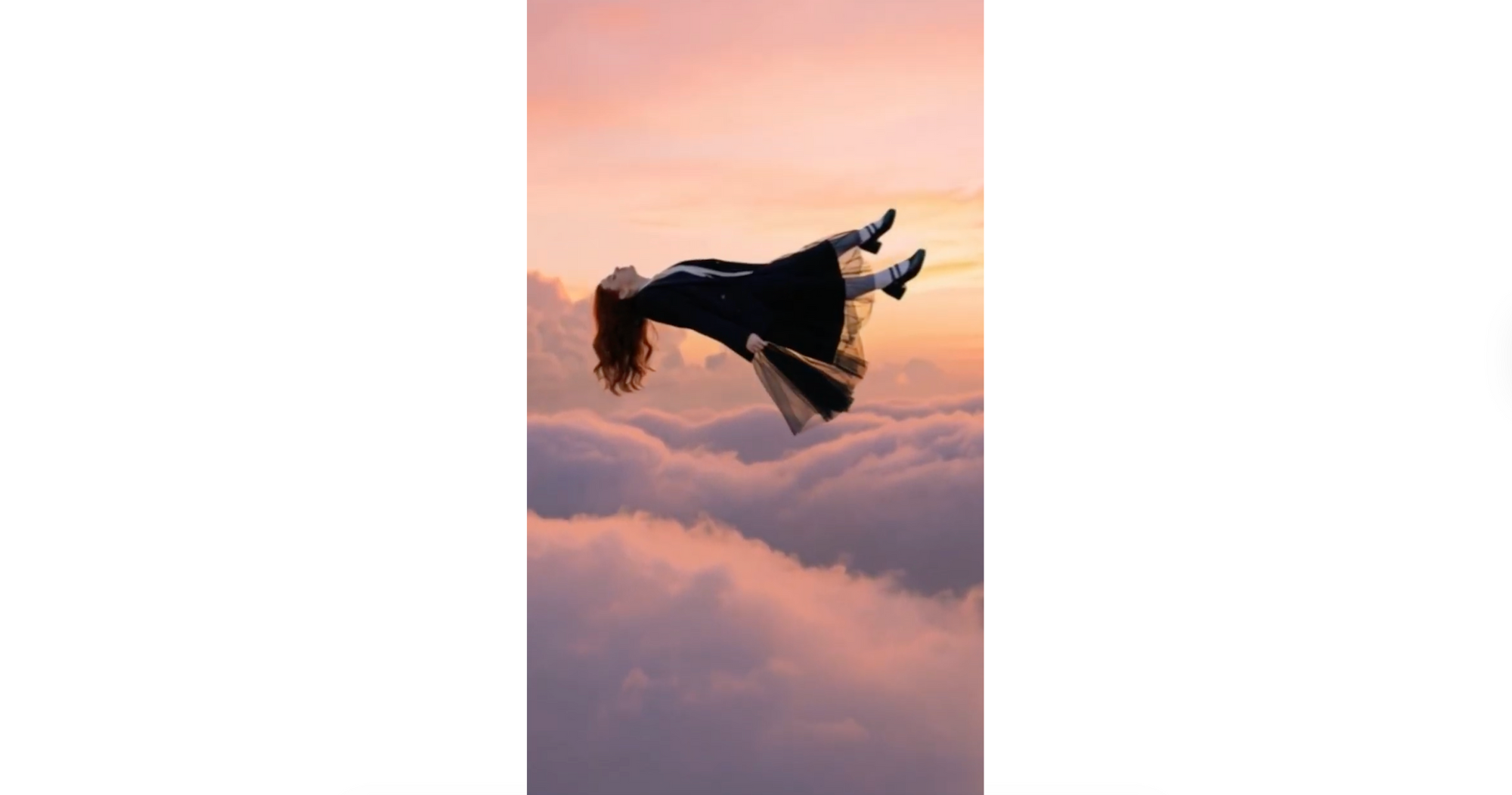
Best for: cinematic storytelling, emotional visuals
Use this when you want: a dramatic, atmospheric scene
Prompt:
🖼️IMAGE PROMPT 1: High above the ground at a rose-tinted sunset, a woman falls backward in a horizontal pose, his expression calm. Shot at eye level with his full body in frame, the scene feels cinematic, with a softly blurred background and rich color grading, as if time has slowed. The generated photo should be 9:16.
🖼️IMAGE PROMPT 2: Regenerate this shot from far away so that the person is barely visible. Keep person in the upper third of the image. The generated photo should be 9:16.
🎥 VIDEO PROMPT: Person falling downward from the sky leaning back into the fall. Camera cinematically follows downward. Make the video in 9:16.
Why it works: Simple motion + strong atmosphere, it focuses on one emotional visual instead of multiple competing effects.
How AI interprets your video prompts
AI video tools don’t “understand” your prompt the way a human would. They break it down into patterns, keywords, and relationships, then predict how the scene should look and evolve over time.
That’s why wording matters more than most people expect.
Small changes like “slow natural movement” vs “fast motion,” or “camera is fixed” vs leaving it undefined can completely change the output. The model is constantly making decisions frame by frame, so your prompt acts like a set of boundaries.
It also helps to think of your prompt in layers:
- Visual layer → what the scene looks like
- Motion layer → how things move
- Camera layer → how the scene is captured
If one of these is missing, the AI fills in the gaps on its own, and that’s usually where results become unpredictable.
Tips to get better results from these prompts
If you’re using the prompts above, a few small tweaks can make a big difference in quality:
- Keep your main subject consistent — avoid adding unnecessary changes
- Be specific with motion words like slow, subtle, smooth, natural
- Always define the camera behavior (fixed, tracking, orbit, drone, etc.)
- Use constraints like “do not change anything else” when needed
- Stick to one main effect per video for cleaner results
Even small adjustments can turn a decent output into something that actually feels polished.
Common mistakes to avoid
Most issues with AI video outputs come from the same patterns:
- Prompts that are too vague — the AI has to guess too much
- Too many effects in one prompt — results become messy
- Missing camera instructions — leads to uncontrolled movement
- No constraints — the model changes things you didn’t want touched
- Conflicting styles — like “cartoon” and “photorealistic” together
If something looks off, it’s usually not the idea, it’s how the instructions are written.
Create your own AI video prompts inside Async
Once you understand how these prompts are structured, you can start building your own ideas instead of relying on templates.
Inside Async, you can take a simple concept and turn it into a complete video workflow. Generate your clip using a prompt, then refine it with editing tools, adjust framing for different platforms, and add elements like subtitles or audio enhancements without switching between tools.
It’s a much smoother way to experiment. Instead of starting from scratch every time, you can iterate quickly, test variations, and turn one idea into multiple versions ready for social platforms.
Go make something that looks impossible to create with AI
At this point, you’ve got more than just a list of prompts. You have a way to think about them.
The difference between average AI videos and the ones that stop people mid-scroll usually isn’t the idea. It’s the execution. Clear motion, controlled camera, and knowing exactly what should stay untouched.
Start simple. Pick one effect. Run it. Then tweak it.
You’ll start noticing what works very quickly.
And once that clicks, you’re not just using prompts anymore, you’re directing.
FAQs
What are AI video prompts?
AI video prompts are text instructions used to generate or animate videos with AI tools. They describe the subject, movement, environment, camera behavior, and style. A well-written prompt helps the AI understand not just what the scene looks like, but how it should evolve over time for more realistic and controlled results.
How do you write a good AI video prompt?
A good AI video prompt clearly defines the subject, action, motion, camera, and style, along with any constraints. Instead of being vague, it uses specific instructions like “slow natural movement” or “camera is fixed.” The more structured and precise your prompt is, the more consistent and realistic the output will be.
What should I include in a text to video prompt?
A strong text to video prompt should include the main subject, what is happening, how things move, where the scene takes place, how the camera behaves, and the overall visual style. It also helps to include constraints, such as what should remain unchanged, especially when working with image-based inputs.
Can I use the same prompt in different AI video tools?
Yes, but results may vary. Different AI video tools interpret prompts slightly differently, especially when it comes to motion and camera behavior. You may need to adjust wording, simplify instructions, or emphasize certain elements depending on the tool you’re using to get the best results.
Why do my AI videos look unrealistic?
Unrealistic results usually come from unclear or overloaded prompts. If motion isn’t defined properly, or if the AI has too many instructions to process at once, the output can feel inconsistent. Adding clear motion, camera direction, and constraints typically improves realism significantly.
What makes an AI video prompt look cinematic?
Cinematic prompts include clear camera direction, controlled motion, and intentional lighting and style choices. Instead of relying on the word “cinematic,” they describe elements like depth of field, camera movement, and lighting conditions. This gives the AI concrete visual guidance, resulting in more polished and professional-looking videos.
PakarPBN
A Private Blog Network (PBN) is a collection of websites that are controlled by a single individual or organization and used primarily to build backlinks to a “money site” in order to influence its ranking in search engines such as Google. The core idea behind a PBN is based on the importance of backlinks in Google’s ranking algorithm. Since Google views backlinks as signals of authority and trust, some website owners attempt to artificially create these signals through a controlled network of sites.
In a typical PBN setup, the owner acquires expired or aged domains that already have existing authority, backlinks, and history. These domains are rebuilt with new content and hosted separately, often using different IP addresses, hosting providers, themes, and ownership details to make them appear unrelated. Within the content published on these sites, links are strategically placed that point to the main website the owner wants to rank higher. By doing this, the owner attempts to pass link equity (also known as “link juice”) from the PBN sites to the target website.
The purpose of a PBN is to give the impression that the target website is naturally earning links from multiple independent sources. If done effectively, this can temporarily improve keyword rankings, increase organic visibility, and drive more traffic from search results.
